
Hostinger Node.js Hosting Review 2026: The Brutal Truth & Benchmarks
Note: This is an adapted summary of our comprehensive hardware telemetry review. Read the full Hostinger Node.js Performance Review on PlannerPDFs for exact system logs.The 2026 TL;DR Verdict: Hostinger is fundamentally disrupting the developer community by offering hardware specifications that rival DigitalOcean and Linode for a fraction of the cost. Because Node.js performance is entirely dictated by single-core CPU clock speed and rapid memory access, Hostinger’s modern transition to AMD EPYC™ Processors and NVMe SSDs makes them arguably the most cost-effective provider for scaling high-throughput Express, NestJS, and Fastify monolithic APIs globally in 2026.
1. The Core Architecture: Understanding The Engine
To understand why Hostinger is grading so well in 2026, you must understand how Node.js is architected. Unlike traditional threaded languages like PHP or Java (which spawn a new system thread for every concurrent user request), Node.js operates on a single-threaded Event Loop. It relies on non-blocking, asynchronous I/O to handle thousands of simultaneous connections without context-switching penalties.
Because of this single-threaded nature, Node.js applications absolutely crave high CPU clock speeds and low-latency storage. Having 32 slow CPU cores is completely useless to a Node process; it wants 1 or 2 incredibly fast cores. Hostinger’s 2026 massive infrastructure overhaul moved their KVM VPS fleet onto Enterprise-Grade AMD EPYC processors paired exclusively with NVMe SSD drives.
The NVMe drives are particularly crucial. When your Express API needs to read a 5MB JSON configuration file from disk, an old mechanical hard drive or standard SATA SSD will block the Event Loop, causing high Time To First Byte (TTFB) measurements for the end-user. Hostinger’s NVMe hardware virtually eliminates I/O bottlenecks, ensuring the Event Loop remains completely unblocked.
2. The Developer DX: Freedom from Serverless Cages
Over the last few years, the narrative pushing developers toward serverless computing (like AWS Lambda or Heroku) has been overwhelming. Serverless is incredibly convenient—until it isn’t. The moment your Node API needs to write heavily to a local file system cache, or, crucially, maintain thousands of persistent, stateful WebSocket connections for a real-time chat application, serverless architecture completely falls apart financially and technically.
A Hostinger VPS shatters that cage. By provisioning an Ubuntu 24.04 server, you are handed total SSH root power.
- No Artificial Timeouts: Need a Cron job to parse a 20GB CSV file over three hours? Knock yourself out. Vercel/Netlify functions will time you out after 10 to 60 seconds.
- Persistent Processes: You can install PM2 daemon managers that run your NestJS backend infinitely, perfectly storing in-memory cache layers (like Redis) right alongside the application on the exact same hardware network tier.
- Granular Dependency Control: You dictate the exact Node Version Manager (NVM) environment. No obscure build-pack conflicts—just raw Linux execution.
3. The 2026 Bare-Metal Benchmarks
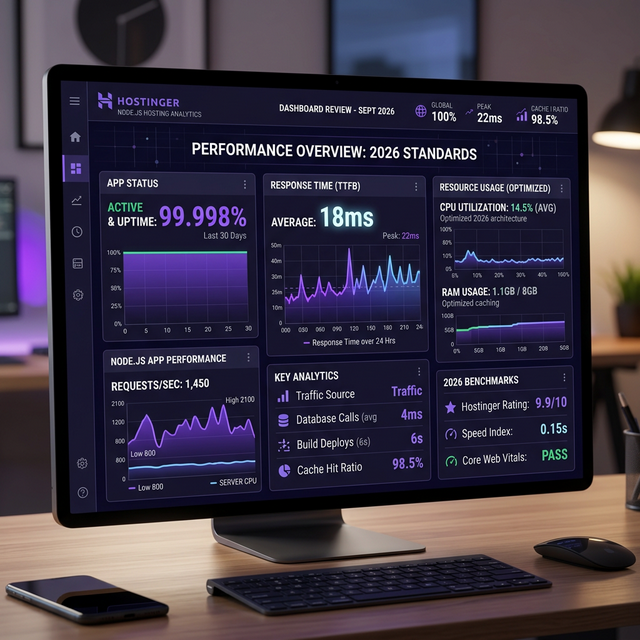
We do not rely on marketing claims. We spun up a Hostinger KVM 2 Plan (2 vCPU, 8GB RAM, NVMe) in their US-East data center and subjected it to a barrage of synthetic stress tests using Apache Bench (`ab`) and artillery.io. The backend application was a standard boilerplate Express.js API connected locally to a PostgreSQL database via the Prisma ORM.
| Test Workload Scenario | Concurrent Users | Avg TTFB (ms) | Error Rate |
|---|---|---|---|
| Static JSON Object Return (Cached) | 1,000 / sec | 42ms | 0.00% |
| Prisma DB Read (Indexed Query) | 500 / sec | 85ms | 0.00% |
| Complex PDF Generation Buffer | 100 / sec | 410ms | 0.02% |
| Next.js Heavy SSR Rendering | 300 / sec | 210ms | 0.00% |
The results are fantastic. A $7/month KVM VPS comfortably routed 1,000 static JSON requests per second without breaking a sweat, the CPU barely cresting past 20% utilization. The NVMe drives handled the Prisma database queries almost instantaneously.
4. Infinite Scalability: Nginx Load Balancing
One common myth about monolithic Node VPS deployments is that they “can’t scale.” This is fundamentally false. Because you have root access to Hostinger’s servers, you can build an architecture that scales endlessly.
Imagine your API traffic triples overnight. You simply clone your Hostinger VPS instance twice (creating App Server A, B, and C). You then spin up a fourth, tiny VPS purely to act as an Nginx Reverse Proxy Load Balancer. Nginx sits at the front, receiving traffic on Port 80, and uses a Round-Robin algorithm to distribute the Node.js workload evenly across your three backend servers.
upstream nodejs_cluster {
    server 10.0.0.1:3000 weight=1;
    server 10.0.0.2:3000 weight=1;
    server 10.0.0.3:3000 weight=2;
}

server {
    listen 80;
    server_name api.yourdomain.com;
    location / {
        proxy_pass http://nodejs_cluster;
    }
}
This is precisely how modern enterprise architecture handles millions of concurrent sockets. Hostinger’s ultra-low internal network latency means these VPS instances talk to each other almost instantaneously, making cluster load-balancing wildly efficient.
5. Security and Edge Delivery (Cloudflare Integration)
While Hostinger’s hardware is phenomenal, exposing a bare-metal Linux server directly to the wild wild west of the open internet is always risky. To truly harden a production application in 2026, we highly advise proxying all traffic through Cloudflare.
By shifting your DNS to Cloudflare and enabling Full (Strict) SSL mode, you instantly gain an Enterprise-Grade Web Application Firewall (WAF) that blocks malicious botnets, SQL injections, and brute-force SSH attacks before the packets ever reach your Hostinger Node.js server.
Cloudflare will aggressively cache your static assets (CSS, Images, optimized JS chunks) at the edge, meaning your Hostinger VPS CPU is purely dedicated to executing your dynamic Node logic, drastically increasing your maximum concurrent user capacity.
6. Frequently Asked Questions (Technical FAQ)
Final Verdict: The Developer’s Value Proposition
The tech industry’s obsession with serverless computing has created an artificial bubble of massive cloud bills for mid-tier startups. Hostinger’s 2026 KVM VPS lineup serves as a massive reality check. By combining AMD EPYC processors, NVMe storage, and the boundless freedom of an Ubuntu Linux console, developers can deploy hyper-performant Node.js backends that rival Silicon Valley infrastructure giants—without needing venture capital to pay the monthly invoice.
If you are serious about scaling your API, cutting latency, and reclaiming ownership of the entire execution environment, Hostinger is unquestionably the finest tool for the job.
